Case · 04 / 04
Banking · Lloyds Banking Group

Business Banking Offboarding

Business Banking customers who want to close their accounts currently have no digital path — they must fill in a paper form, post it, and wait with no visibility of where they are in the process. This project digitalises that journey, giving customers a clear, self-serve way to close their accounts online while eliminating the ambiguity and friction of a manual, paper-based process.

RoleLead UX Designer
SectorBusiness Banking · Lloyds Banking Group
DurationTBC
PlatformDesktop & Mobile Web
The Team & Process

Who was involved and how we worked.

Product OwnerStakeholder & scope
CJMCustomer journey manager
EngineeringTBC
QATBC
ResearchUser researcher
DesignUX / UI / Service designer
ContentContent writer
ExternalLegal & compliance — as needed
01 Stakeholder mapping Every project starts with a stakeholder map — identifying all team members, external colleagues, and dependencies so nothing is missed and the right people are involved from the start.
02 Working groups & requirements In progress Working groups are running weekly — stakeholders are kept closely involved throughout, with design progress shared and discussed at each session. Requirements are continuously documented and refined in Jira as the project evolves.
03 Sketches & early wireframes Before committing to any direction, I sketched ideas quickly to bring to working groups — lightweight enough to invite challenge, clear enough to spark a useful conversation with stakeholders.
04 Strawman prototype Once alignment was reached on direction, we built a strawman prototype to give the project shape — enough to stress-test assumptions internally before going anywhere near users.
05 Research & iteration With something concrete to test, we created a research discussion plan and defined the assumptions we needed to validate. Testing findings fed directly back into the design — iterating until we had something we were confident to ship.
06 High-fidelity prototype & stakeholder sign-off Once the design was validated through research, we moved to a high-fidelity prototype reflecting the final UI and content. This was presented to stakeholders for formal sign-off — ensuring everyone from product to legal was aligned before a single line of production code was written.
07 Dev handover & build monitoring In progress Designs have been handed over to engineering with annotated specs and a dedicated walkthrough covering edge cases, states, and interactions. The build is underway — a small number of final design queries are still being resolved as the team moves toward completion.
08 Performance monitoring via Power BI Pending The project is currently in build with a live date expected at the end of August 2026. Once live, we will use Power BI dashboards to track performance against our defined success metrics — monitoring adoption, completion rates, and any downstream impact on support volumes.
The Problem

Leaving the bank with no digital door.

"I filled in the form, scanned it, emailed it over, and then just waited. I had no idea if they'd received it or what happened next."

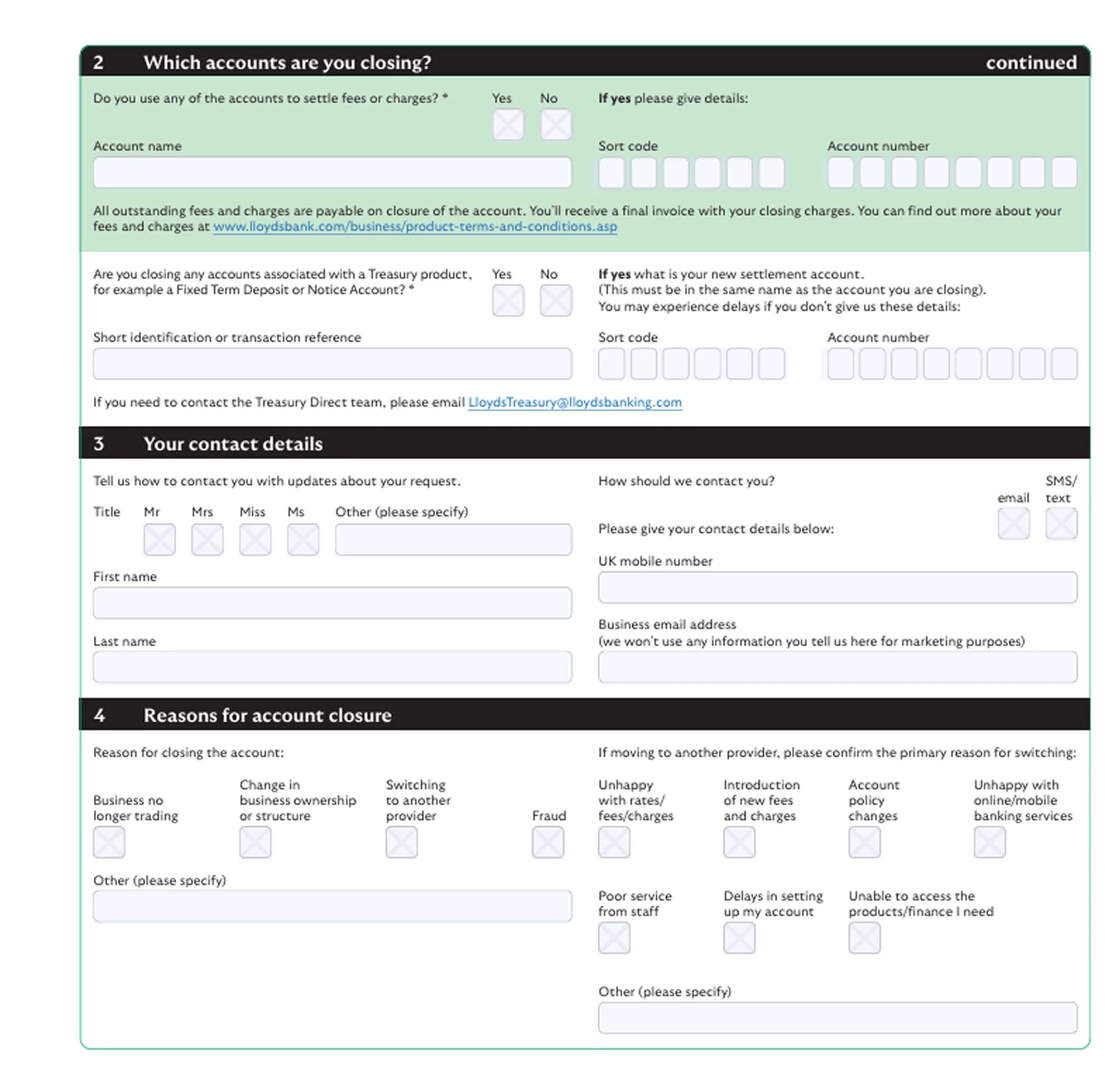
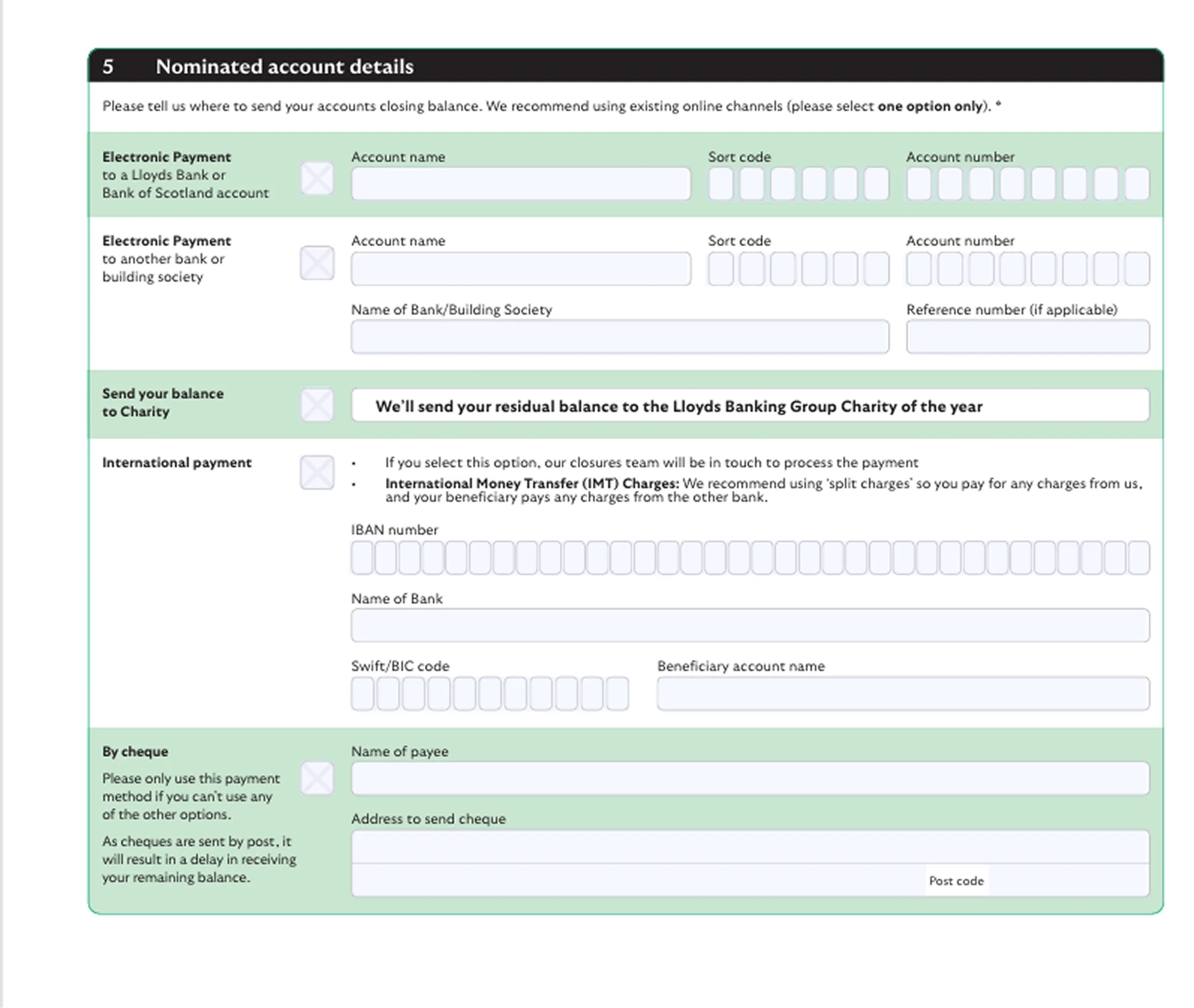
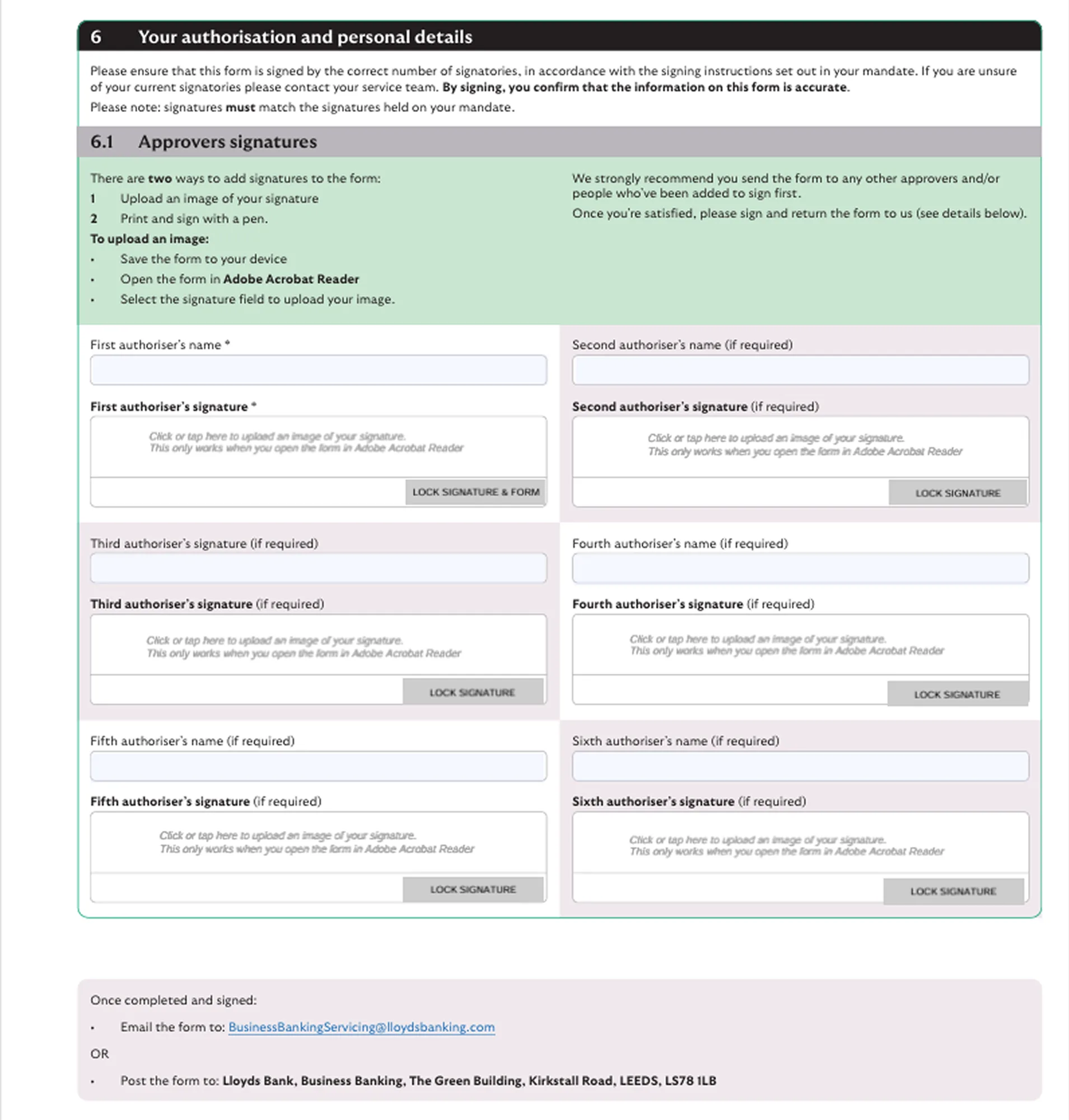
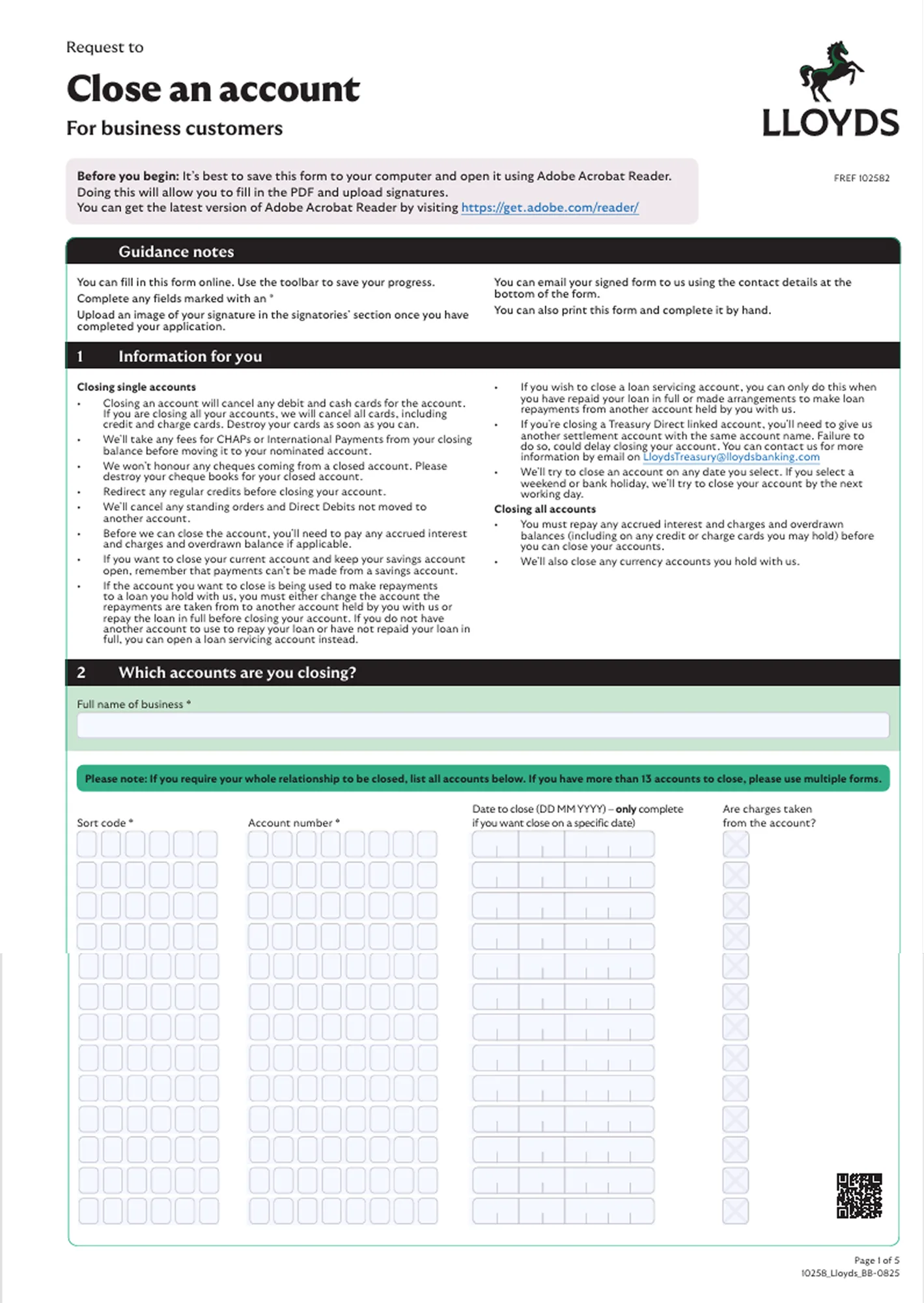
When a Business Banking customer decides to close their accounts, they must complete a four-page form — either filled in electronically or by hand — and email it as a scanned document to the bank. There is no dedicated digital journey, no acknowledgement of receipt, and no way for the customer to track where their request is in the process once it has been sent.

For businesses going through what is already a significant transition, this adds unnecessary friction and uncertainty at exactly the wrong moment. For the bank, it creates processing overhead, data quality risks, and a poor final impression of a relationship that may have spanned years.

  • 01 No dedicated digital journey. While customers can fill the form electronically and email it, there is no purpose-built digital experience — no guided flow, no validation, and no structured submission. It is a workaround, not a solution.
  • 02 No visibility of progress. Once the form is emailed, customers have no way to confirm it has been received or track where their request is in the process — leaving them in the dark for days or weeks, and prompting avoidable calls to support.
  • 03 Ambiguity and errors. A four-page unguided form introduces significant room for incomplete or incorrect submissions — missing fields, wrong account details, unclear instructions — each of which delays processing and generates unnecessary back-and-forth.
  • 04 A poor end to the relationship. The offboarding experience is the bank's last interaction with a departing customer. An unstructured, email-based process leaves a negative final impression — and does nothing to retain the goodwill that might bring a customer back in the future.
Behaviour Change

Designing for different choices.

Behaviours we were driving

  • TBC. Behaviour to be added.
  • TBC. Behaviour to be added.

Behaviours we were discouraging

  • TBC. Behaviour to be added.
  • TBC. Behaviour to be added.
The Solution

TBC — solution headline.

1
TBC — step title

TBC — step description to be added.

2
TBC — step title

TBC — step description to be added.

3
TBC — step title

TBC — step description to be added.

The Screens

The paper form being digitalised.

The current state These four pages are the paper form Business Banking customers must currently complete to close their accounts. It is posted to the bank, offers no confirmation of receipt, and leaves the customer with no visibility of where they are in the process. The digital journey we are designing replaces this entirely — giving customers a clear, step-by-step online experience with real-time status and no ambiguity.

Paper form — Page 1 of 4
Offboarding paper form — page 1
Paper form — Page 2 of 4
Offboarding paper form — page 2
Paper form — Page 3 of 4
Offboarding paper form — page 3
Paper form — Page 4 of 4
Offboarding paper form — page 4
Measuring Success

Everybody wants to win — here's how we defined it.

TBC — metric to be added

  • 01 TBC — metric description to be added.

TBC — metric to be added

  • 02 TBC — metric description to be added.
The Results

TBC — results headline.

TBC
Metric label

TBC — result description to be added.

TBC
Metric label

TBC — result description to be added.

TBC
Metric label

TBC — result description to be added.